What changed in July 2026: Desktop 2024 has no end date
Update, July 2026: Intuit confirmed QuickBooks Desktop 2024 no longer has a sunset date. Desktop 2023 lost bank feeds, payroll tax updates, payments, and security updates after May 31, 2026, but 2024 subscribers can keep renewing. This guide is for U.S. business owners still on Desktop deciding whether to renew, host, upgrade, or move. If you want a straight answer for your file, book a free consultation.
Ended: May 31, 2026. QuickBooks Desktop 2023, including Enterprise 23.0, Pro Plus, Premier Plus, and Mac Plus, lost payroll, bank feeds, payment processing, and Intuit support on this date. The cutoff applied to every 2023 version user, regardless of subscription renewal date. See the full migration checklist
We've been hearing from a lot of businesses, current clients, and people who found us searching for answers, all with some version of the same question: "We got a message in QuickBooks about service ending May 31st & needing to upgrade… Is this automatic? Do we need to do something? Can we just ignore it?"
The short answer: if you're still on Desktop 2023 and use payroll, bank feeds, or payment processing, those services have already stopped, and nothing upgrades automatically. If you're on Desktop 2024, Intuit confirmed in July 2026 that your version has no end date. This article covers what changed, what still works, and the paths forward for both groups.
What Happened to QuickBooks Desktop 2023 on May 31, 2026?
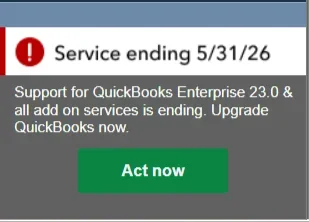
Service Ending Error Message QuickBooks Desktop 2023
This was part of Intuit's rolling three-year lifecycle for QuickBooks Desktop versions. Under that policy, each version was supported for roughly three years from release; when the window closed, Intuit stopped security updates, technical support, and the connected services behind payroll and bank feeds. Desktop 2024 is the exception. In July 2026, Intuit moved it off the three-year cycle to continuous updates with no announced sunset date.
Intuit followed this schedule for every prior version. QuickBooks Desktop 2022 went through the same sunset on May 31, 2025, and Desktop 2023 followed on May 31, 2026.
Important clarification: This is a service discontinuation, not a complete shutdown. QuickBooks did not lock anyone out of their company file after May 31. The software itself will still open. What stops working are the features that connect to Intuit's servers, and for most businesses, those are significant.
*Note on timing: The May 31, 2026, service cutoff applied to all QuickBooks Desktop 2023 users on the same date; it did not depend on when an individual annual subscription renews. Your subscription renewal date is separate and determines when you lose access to the software itself.
Desktop 2024 has no end date. Your renewal price is a different story.
Desktop to QuickBooks Online typically takes 3–6 weeks, and Desktop to Intuit Enterprise Suite 6–10 weeks. To start 2027 on a new system, kick off by mid-November.
What Stopped Working in QuickBooks Desktop 2023 After May 31
Here's what changed after May 31, 2026, per Intuit's discontinuation policy:
What Stopped Working
Payroll Services: All payroll tiers are affected. Assisted Payroll was deactivated, and tax forms are no longer filed on your behalf. Basic and Enhanced Payroll no longer calculate taxes automatically, so paychecks may be inaccurate. QuickBooks Workforce is no longer accessible for you or your employees.
Online Bank Feeds: You can't download transactions, send online payments, or send online transfers, and transaction uploads are discontinued. Transactions have to be entered manually.
Payment Processing: Credit card and ACH transactions can't be processed through QuickBooks Desktop 2023, and eInvoice (email of invoice with pay link) no longer works.
Note: if you have recurring payments set up, those transactions will continue to process but you'll need to manage them outside QuickBooks at https://merchantcenter.intuit.com/msc/portal/home. Learn more here: https://quickbooks.intuit.com/learn-support/en-us/help-article/process-credit-card-payments/process-payments-merchant-service-center/L4t0JMv2G_US_en_USSecurity Updates: No more patches. Your financial data now sits on software that isn't updated against new vulnerabilities, which is a real compliance and security concern for businesses handling customer payment data or payroll records.
Live Technical Support: Intuit no longer assists with issues on 2023 versions.
Email of Forms and Reports: You can't email invoices, reports, or other forms directly from QuickBooks Desktop 2023.
Shipping Manager: Access to the QuickBooks 2023 shipping experience has been discontinued.
Other Connected Services: Multi-currency and exchange rate updates, Accountant Copy Transfer Service, Contributed Reports, and Merchant Service Deposit reconciliation no longer work.
What Still Works
Company File Access: Your company file stays intact and can still be opened.
Manual Transaction Entry: Basic bookkeeping functions like entering invoices and bills still work.
Reporting: Running reports (P&L, Balance Sheet, etc.) on existing data still functions.
Local Data: Your historical data is not deleted or removed.
A note on security risk: Even if you only need basic access after May 31, running unpatched accounting software that holds sensitive financial and employee data creates real security exposure. Known vulnerabilities won't be fixed going forward. This is particularly important for businesses that handle customer payment information or store payroll data.
Still on QuickBooks Desktop 2023? What Breaks Heading Into W-2 and 1099 Season
Businesses still running payroll in QuickBooks Desktop 2023 are the most exposed group right now. Desktop 2023 stopped receiving payroll tax table updates after May 31, 2026, so any paycheck calculated since then may be using outdated tax rates, and Assisted Payroll no longer files forms on your behalf.
January is where that turns into a filing problem. 2026 Forms W-2 and 1099-NEC are due at the end of January, and preparing them from an unsupported version means checking every number by hand and filing outside QuickBooks.
If you're in this situation, you have three fast options: upgrade to Desktop 2024, move payroll to a supported service, or migrate the whole file to QuickBooks Online or Intuit Enterprise Suite with a January 1 start. Each one needs a plan for how your 2026 year-end forms get filed.
Book a Free Consultation or Call Certum Solutions at 980-210-6946
Which QuickBooks Desktop Versions Are Affected
The May 31, 2026, deadline applies to all QuickBooks Desktop 2023 products:
QuickBooks Desktop Pro Plus 2023
QuickBooks Desktop Premier Plus 2023 (General Business, Contractor, Manufacturing & Wholesale, Nonprofit, Professional Services, and Retail)
QuickBooks Enterprise Solutions 23.0
QuickBooks Premier Accountant Edition Plus 2023
QuickBooks Enterprise Accountant 23.0
QuickBooks Desktop for Mac Plus 2023
How to check your version right now: Open QuickBooks Desktop and press F2 (or go to Help > About QuickBooks). Your version year and release number will appear at the top of the Product Information window.
If you're on QuickBooks Desktop 2024, you were not affected by the May 31 deadline, and as of July 2026 your version has no sunset date. Intuit moved Desktop 2024 to continuous in-product updates instead of annual releases. It is still the last non-Enterprise Desktop version, and new Pro Plus, Premier Plus, and Mac Plus subscriptions are no longer sold.
If you're on QuickBooks Desktop Enterprise, your version follows a separate timeline. Enterprise is the only Desktop edition Intuit continues to actively sell and develop going forward. Existing subscribers receive version 2024 at no extra cost as part of their annual plan.
Intuit's Desktop Discontinuation Timeline
May 31, 2024 - QuickBooks Desktop 2021 support ended
September 30, 2024 - Intuit stopped selling new Desktop Pro Plus, Premier Plus & Mac Plus to new U.S. subscribers. Existing subscribers can still renew. Enterprise unaffected.
May 31, 2025 - QuickBooks Desktop 2022 support ended
May 31, 2026 - QuickBooks Desktop 2023 support ended
July 2026 - Intuit moved QuickBooks Desktop 2024 off the three-year lifecycle. Desktop 2024 now receives continuous updates with no announced sunset date. It remains the final non-Enterprise Desktop version; there are no 2025, 2026, or 2027 annual releases.
October 1, 2026 - Intuit's second Desktop price increase of 2026 takes effect for Desktop Plus, Desktop Accountant, and most Desktop Payroll renewals.
December 1, 2026 - Renewal price increase takes effect for QuickBooks Legacy Enhanced Payroll subscriptions.
Your Options Now That QuickBooks Desktop 2023 Support Has Ended
There is no universal right answer. Here are the realistic paths forward:
Option 1: Upgrade to QuickBooks Desktop 2024
The simplest path for businesses that want to stay on Desktop. Desktop 2024 is the final non-Enterprise version and, as of July 2026, has no sunset date. Existing Desktop Plus subscribers get this upgrade as part of their annual plan; check with Intuit or a ProAdvisor to confirm eligibility. Budget for the renewal itself: Intuit raised Desktop renewal pricing twice in 2026.
Best for: Businesses happy with Desktop whose users, entities, and integrations still fit it, and who have budgeted for higher renewals.
Option 2: Upgrade to QuickBooks Desktop Enterprise
The only Desktop edition Intuit continues to actively sell and support long-term. Includes advanced inventory, job costing, up to 40 simultaneous users, customizable user roles, 200+ reports, and Priority Circle support. Pricing is annual-only and has increased in recent years; recommended if you need its advanced feature set.
Best for: Larger operations that rely on advanced Desktop features and want to stay on-premise long-term.
Option 3: Migrate to QuickBooks Online or Intuit Enterprise Suite (or another platform)
Cloud-based, accessible anywhere, available on monthly or annual billing. Intuit's migration tool can move your chart of accounts, customer and vendor lists, and up to two years of transaction history. QuickBooks Online does lack some Desktop-specific features; particularly advanced inventory with assemblies, sales orders, and certain job costing workflows.
Best for: Businesses ready to move to the cloud, or those already evaluating a new ERP or accounting platform.
Our take as ProAdvisors
Our take as ProAdvisors: A manufacturing company that relies on QuickBooks Desktop's job costing and assemblies should evaluate Enterprise or a purpose-built ERP before jumping to QBO. A professional services firm with straightforward needs will often find QBO is more than enough; and less headache going forward. We help you evaluate this based on what you use.
Option 4: Host QuickBooks Desktop or Enterprise in the Cloud
Hosting keeps your current QuickBooks Desktop or Enterprise file exactly as it is and runs it on a secure remote server, so your team can work from any location. You keep every Desktop feature you rely on, including advanced inventory and job costing, and add remote access, backups, and multi-factor sign-in. Hosting is an added monthly cost on top of your renewal, and it doesn't change what the software can do.
Best for: Teams that depend on Desktop or Enterprise features and need remote or multi-location access. Certum Solutions is a Summit Platinum Partner and sets up QuickBooks Enterprise hosting with Summit →
Option 5: Move Off Intuit Entirely
Some businesses leaving QuickBooks Desktop are better served outside the Intuit ecosystem. Zoho Books fits businesses already using Zoho apps for CRM, inventory, or HR, and AI-first ledgers like Digits fit businesses whose main goal is less manual bookkeeping. Expect a new interface, new workflows, and a closer look at which apps still connect.
Best for: Businesses whose price or workflow frustrations are with Intuit itself, not just Desktop. See Zoho Books implementation or Digits vs. QuickBooks Online.
Not sure which path fits your business?
Take our Find My Software Quiz to get an idea of an option for you.
If You're Switching to a New ERP: Can You Go Month-to-Month?
This is one of the most common questions we're getting right now, if your business is mid-transition to a new platform (Zoho One, Odoo, or another ERP), committing to a full year of QuickBooks may feel like throwing money away.
Intuit does not offer a month-to-month option for QuickBooks Desktop. Desktop subscriptions are annual. However, you do have realistic workarounds:
QuickBooks Online does offer monthly billing, migrating to QBO temporarily while your new system goes live is a viable short-term bridge for many businesses.
Run parallel systems temporarily, some businesses maintain light QuickBooks access for reporting or historical reference during the transition without relying on it as the primary system.
Accelerate your ERP go-live timeline, in many cases, a structured implementation plan can tighten your go-live date, so you're not caught paying for two systems longer than necessary. This is something we actively help clients plan.
If you're mid-ERP transition: This scenario has a lot of moving parts and the right answer depends on where you are in your implementation, what data you still need QuickBooks access for, and your go-live timeline. Book a call with our team and we'll help you map out the cleanest path forward.
What to Do Now If You're on QuickBooks Desktop 2023 or 2024
Regardless of which path you choose, here's what we recommend right now:
Step 1: Back Up Your Company File Today: Go to File > Back Up Company > Create Local Backup and save a copy to a secure location, ideally two separate locations. This is your safety net regardless of what you decide to do next.
Step 2: Confirm Which Version You're Running: Press F2 in QuickBooks to verify your version. If you're on 2023 or earlier, your connected services have already stopped, so act now. If you're on 2024, you're supported, so the decision is about cost and fit at your next renewal.
Step 3: Decide on Your Path: Upgrade to Desktop 2024, move to Enterprise, migrate to QBO, or begin a broader ERP evaluation. If you're unsure, this is exactly what our free consultation is designed to help you figure out; without pressure toward any one option.
Step 4: Plan the Transition After Hours: If you're upgrading or migrating, do it during evenings or weekends to avoid disruptions to active users or payroll runs in progress.
Step 5: Validate Your Numbers After the Transition: After any upgrade or migration, run your Profit & Loss and Balance Sheet and compare bank balances and payroll figures to what you had before. Discrepancies happen, catch them early.
Book a Free Consultation
Frequently Asked Questions
Is QuickBooks Desktop 2023 being discontinued?
Yes. Intuit ended support for QuickBooks Desktop 2023 on May 31, 2026. This affected all 2023 versions, including Pro Plus, Premier Plus, Mac Plus, and Enterprise 23.0. Payroll, bank feeds, payment processing, security updates, and live technical support have stopped. The software still opens, but the connected services most businesses depend on no longer function. QuickBooks Desktop 2024 is not affected and, as of July 2026, has no announced end date.
I'm still on QuickBooks Desktop 2023. What should I do now?
Act now. The connected services for QuickBooks Desktop 2023 stopped on May 31, 2026, for every 2023 user at once. If you still run payroll, bank feeds, or payments in Desktop 2023, you are operating without tax table updates or security patches, and the next pressure point is filing 2026 W-2s and 1099s in January. Upgrade to Desktop 2024, move to Enterprise, or migrate to QuickBooks Online or Intuit Enterprise Suite.
Will QuickBooks Desktop 2023 stop working completely after May 31, 2026?
Not entirely, but significantly. QuickBooks Desktop 2023 did not lock anyone out of their company file after May 31. You can still open it, enter transactions manually, and run reports on existing data. What stops working are all features that connect to Intuit's servers: payroll tax calculations, bank feeds, payment processing, emailing forms, security patches, and live support. For most businesses, losing those features makes the software effectively unworkable for day-to-day operations.
Do I need to manually upgrade QuickBooks Desktop 2023, or does it upgrade automatically?
You need to act manually. The service ending notification Intuit sends is automatic, but the upgrade or migration is not. QuickBooks Desktop 2023 will not update itself to a newer version, and Intuit will not migrate your data on your behalf. If you want to maintain full functionality after May 31, 2026, you need to choose a path — upgrade to Desktop 2024, move to Enterprise, or migrate to QuickBooks Online — and do it as soon as possible, since the deadline has passed.
Does the QuickBooks Desktop 2023 service cutoff depend on my subscription renewal date?
No. The May 31, 2026 service cutoff is universal for all QuickBooks Desktop 2023 users and does not shift based on when your individual annual plan renews. Your renewal date is a separate matter — it determines when you lose access to the software itself. But the connected services (payroll, bank feeds, payment processing, live support) stop for every 2023 version user on May 31, regardless of your renewal schedule. Do not assume you have more time because your subscription renews later in the year.
Can I go month-to-month on QuickBooks Desktop 2023 while I transition to a new system?
QuickBooks Desktop does not offer month-to-month billing. Desktop subscriptions are annual only. If you are mid-transition to a new ERP or accounting platform and need a short-term bridge, QuickBooks Online is the more flexible option — it offers monthly billing and can serve as a temporary home for your data while your new system goes live. We can also help you build a transition timeline that minimizes overlap and avoids paying for two systems longer than necessary. Book a free consultation and we'll map it out with you.
How do I check which version of QuickBooks Desktop I'm running?
Open QuickBooks Desktop and press F2 on your keyboard, or go to Help > About QuickBooks. Your version year and release number will appear at the top of the Product Information window. If it shows 2023 or earlier, your connected services ended May 31, 2026, and you need to act. If it shows 2024, you're supported. As of July 2026, Intuit has given Desktop 2024 no end date, though it remains the final non-Enterprise version and renewal prices have risen.
What happens to my QuickBooks Desktop 2023 company file after May 31, 2026?
Your company file data stays intact and remains accessible. QuickBooks Desktop 2023 will still open your file, and your historical records are not deleted or removed. The risk is not data loss — it is the loss of connected services and, over time, growing security exposure from running software that will no longer receive patches against new vulnerabilities. For businesses storing payroll records or customer payment data, that is a real compliance concern, not just an inconvenience.
Is QuickBooks Desktop being completely discontinued?
No. Intuit stopped selling new Pro Plus, Premier Plus, and Mac Plus subscriptions to new U.S. customers in September 2024, and Desktop 2023 lost support on May 31, 2026. But in July 2026, Intuit confirmed Desktop 2024 has moved off the three-year lifecycle with no sunset date, and QuickBooks Desktop Enterprise is still sold and supported. There will be no Desktop 2025, 2026, or 2027 annual releases; Desktop 2024 receives continuous updates instead.
Should I upgrade to QuickBooks Desktop 2024 or switch to QuickBooks Online after the 2023 end of support?
It depends on what your business actually uses day-to-day. If you rely on advanced inventory with assemblies, sales orders, job costing workflows, or more than a handful of simultaneous users, QuickBooks Online may not fully replace what you have in Desktop today — and jumping too quickly could create operational gaps. In that case, upgrading to Desktop 2024 or evaluating Enterprise gives you more runway to make a considered decision. If your needs are more straightforward — invoicing, payroll, bank reconciliation, basic reporting — QuickBooks Online is often a better long-term fit and easier to maintain going forward. Not sure which category you fall into? Our free consultation is designed to answer exactly that question based on how your business actually uses the software, not a generic checklist.
How much does it cost to upgrade from QuickBooks Desktop 2023?
If you are an existing QuickBooks Desktop Plus subscriber, the upgrade to Desktop 2024 is typically included at no extra cost as part of your annual plan — confirm your eligibility with Intuit or a ProAdvisor before your deadline. Upgrading to QuickBooks Desktop Enterprise carries a separate annual cost that has increased in recent years; pricing depends on the number of users and the feature tier you need. Migrating to QuickBooks Online involves its own subscription cost, which varies by plan. We can walk you through a side-by-side cost comparison based on your current setup during a free consultation — including what you are paying now versus what each path would actually cost you going forward.
What data carries over if I migrate from QuickBooks Desktop 2023 to QuickBooks Online?
Intuit's migration tool moves your chart of accounts, customer and vendor lists, products and services, and up to two years of transaction history. It does not transfer everything — certain Desktop-specific features like advanced inventory with assemblies, sales orders, and some job costing data do not map cleanly to QuickBooks Online. After any migration, it is critical to run your Profit and Loss, Balance Sheet, and bank reconciliation reports and compare them against your Desktop records before closing out the old system. Discrepancies are common and much easier to catch and fix in the days immediately after migration than weeks later.
Can a Certum Solutions advisor help me with my QuickBooks Desktop 2023 upgrade or migration?
Yes — that is exactly what we do. Whether you need someone to handle the full upgrade or migration process, walk you through it step by step, or help you evaluate whether staying on Desktop, moving to QuickBooks Online, or switching to a different platform entirely is the right call for your business, we are available. We work with businesses across the U.S. and offer a free 30-minute consultation with no pressure and no pitch — just a clear-eyed look at your setup and what makes sense next. Book your free consultation at certumsolutions.com or call us at 980-210-6946.
What are the alternatives to QuickBooks Desktop?
The three realistic alternatives are QuickBooks Online (cloud-based, the most common move for straightforward businesses), QuickBooks Enterprise (stays in a Desktop-style environment with no support deadline, right for businesses that need its advanced inventory or job costing features), and Intuit Enterprise Suite if multi-entity consolidation or dimensional reporting has become the real bottleneck rather than just the support deadline.
How do I migrate from QuickBooks Desktop to QuickBooks Online?
Intuit's built-in migration tool (Company menu → Export Company File to QuickBooks Online) handles simple files but only transfers about two years of transaction history and commonly produces discrepancies once a file has any real complexity. For anything beyond a very simple setup, a professional migration preserves full historical transactions, customer and vendor records, and open balances, and includes validation before you go live. We handle this as part of our QuickBooks migration services.
Does QuickBooks Desktop 2024 have an end-of-life date?
No. In July 2026, Intuit confirmed that QuickBooks Desktop 2024 has moved off its three-year release lifecycle and has no sunset date. Desktop 2024 receives continuous in-product updates instead of annual versions, and existing subscribers can keep renewing. New Pro Plus, Premier Plus, and Mac Plus subscriptions are still not sold to new customers.
How much does a QuickBooks Desktop renewal cost in 2026?
QuickBooks Desktop renewal pricing rose twice in 2026: once for renewals from February 1 and again for Desktop Plus, Desktop Accountant, and most Desktop Payroll renewals dated on or after October 1, 2026. Your exact price depends on your product and number of users and is shown on your renewal notice. Compare it against the cost of hosting, QuickBooks Online, or Intuit Enterprise Suite before you renew; our QuickBooks Desktop renewal guide walks through the math.
Explore More from Certum Solutions
QuickBooks Online Plans Compared (2026) — Solopreneur, Simple Start, Essentials, Plus, or Advanced? Find out which QBO plan actually fits your business without overpaying.
ERP & System Implementation Services — If QuickBooks has outgrown your business, explore platform-agnostic ERP implementation support. We help you build the right financial tech stack — not just the one we're paid to sell.
Free Resources & Library — Guides, comparisons, and explainers on QuickBooks, Odoo, AI in bookkeeping, and more. All free, no sign-up required.
Fractional CFO & Controller Services — Strategic financial leadership without the full-time executive cost — ideal for businesses navigating software transitions and growth.
About Certum Solutions
Certum Solutions is a Monroe, NC-based (Charlotte metro) accounting and systems consulting firm. Our team includes certified professionals who help businesses navigate accounting software decisions, clean up their books, and build the right financial tech stack for their stage of growth. We work with clients across the U.S. Book a free consultation or call 980-210-6946.
Ready to Decide Before Your Next Renewal?
Free 30-minute call. No pressure, no pitch. We'll review your setup and tell you exactly what needs to happen.
Book Your Free Consultation or Call 980-210-6946